Home › Templates › Chart pages
Chart page templates for PowerPoint
Chart pages with the message already built around the chart: columns with takeaways, stacked columns with growth rates, a waterfall, a ranking with one bar picked out, a Mekko market map and a line chart with a callout. Use them when the layout around the chart matters as much as the numbers. Each one arrives in your deck's own colors and fonts.
- Mac: all 20, in the Templates tab of the SlideShortcuts panel.
- Windows: all 20, under Insert > Templates on the SlideShortcuts tab.
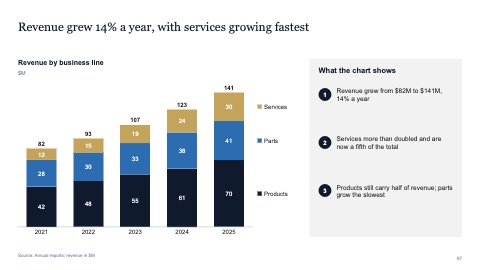
Column chart with takeaways
MacWindows
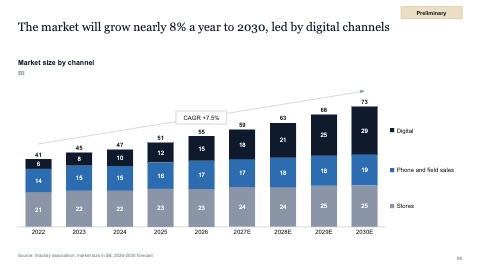
Stacked columns with growth rate
MacWindows
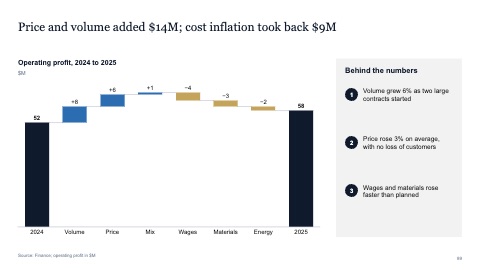
Waterfall
MacWindows
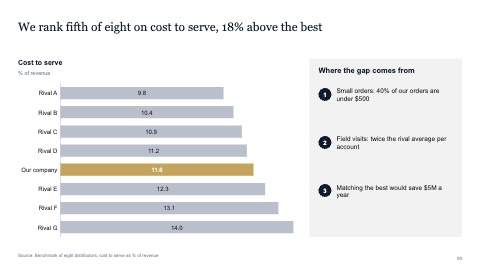
Ranking with one bar picked out
MacWindows

Mekko market map
MacWindows
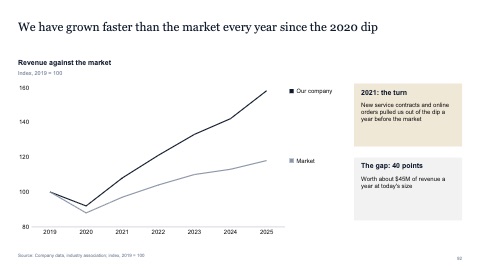
Line chart with a callout
MacWindows
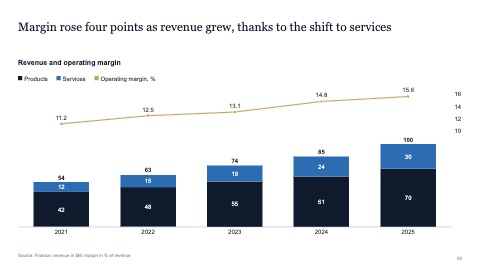
Columns with a line
MacWindows
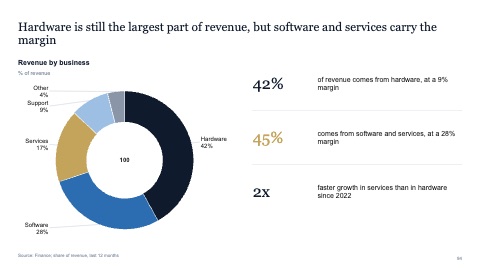
Donut with messages
MacWindows
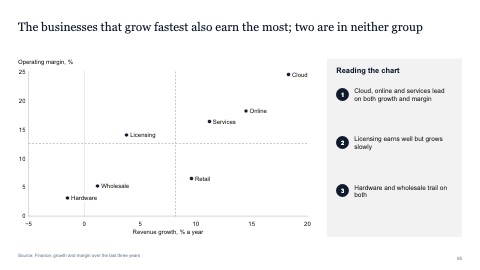
Scatter with labels
MacWindows
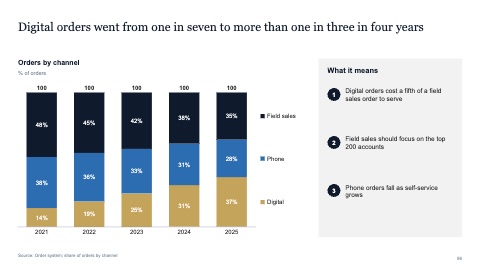
100% columns showing a shift
MacWindows
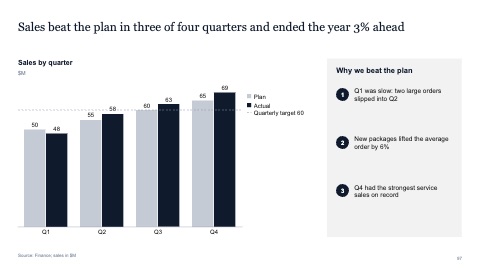
Plan against actual
MacWindows
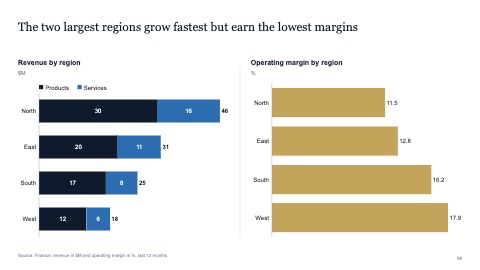
Two charts side by side
MacWindows
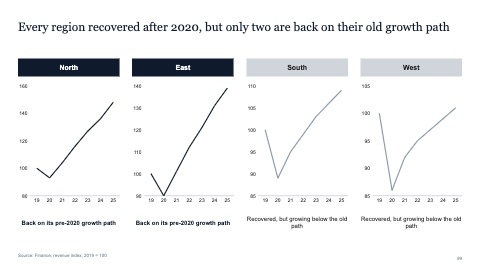
Small multiples
MacWindows
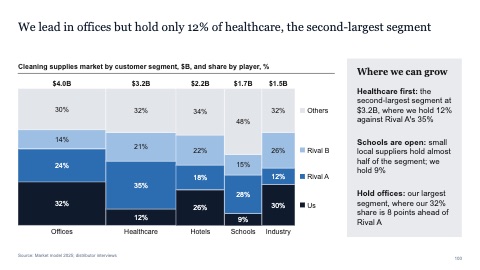
Mekko of market share by segment with a takeaway panel
MacWindows
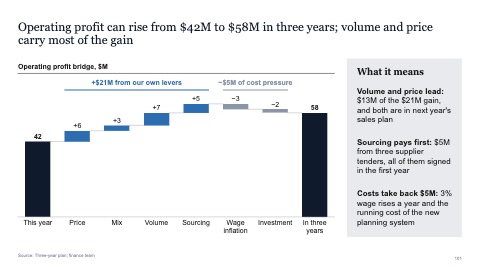
Profit bridge waterfall with brackets and a takeaway panel
MacWindows
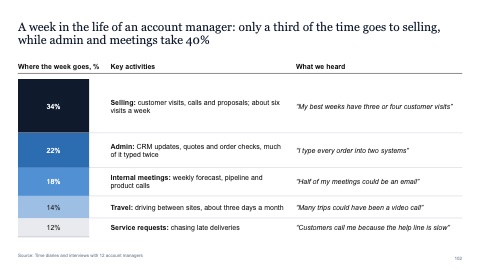
Week in the life: time split with activities and quotes
MacWindows
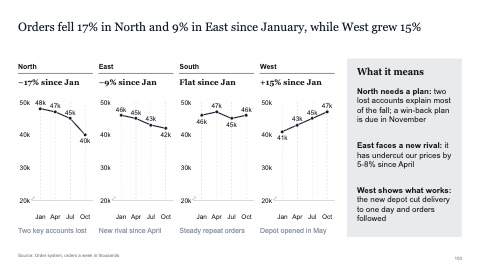
Small multiples: four regional line charts with a takeaway panel
MacWindows
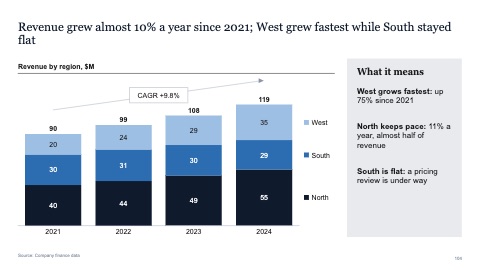
Stacked columns with growth rate and a takeaway panel
MacWindows
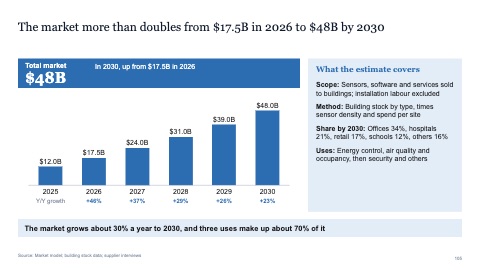
Market growth: headline number, columns with yearly growth and scope
MacWindows
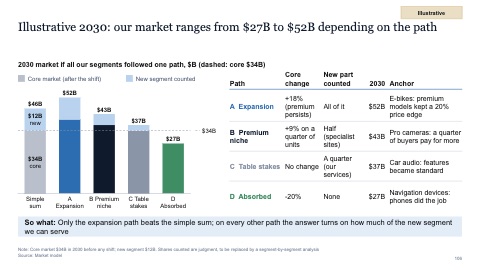
Scenario columns with a reference line and what each path assumes
MacWindows
Numbers and names on the templates are samples. Replace them with your own.
Questions
How do I make a waterfall chart in PowerPoint?
Recent versions of PowerPoint have a Waterfall chart under Insert > Chart. Set the first and last bars as totals and label every step. In PowerPoint on Windows and Mac, SlideShortcuts also draws waterfalls and other charts as PowerPoint shapes, with the numbers in a data sheet: see Charts.
What is a Mekko chart?
A chart whose column widths and heights both carry data, often market size by segment and each player's share within it. One picture shows where the market is and who holds it.
Try every page in your own deck
Every SlideShortcuts plan includes the templates, the keyboard shortcuts and the charts.
Start free trial7 days free, then $9.99 a month plus any tax. Card required. We email you 3 days before the trial ends. Cancel before day 7 and pay nothing.